
The Skyroo platform login is the gate to everything that matters on the platform - the pokies lobby, the AUD cashier, the Mission Hub task list, Sky Drop credit and your spot on the daily leaderboard. Sign in happens at skyrooauss.com/login, and the screen greets returning punters with "Welcome Back, Legends" above a two-tab panel that flips between Login and Register.
At Skyroo casino, access is tied to your mobile number rather than an email address, which keeps the sign-in short but makes phone access the single most important thing to protect. This guide walks through the form field by field, covers password recovery, explains when verification documents get asked for, and works through the errors that stop punters getting in.
| Login Essentials | Details |
|---|---|
| Where to log in | skyrooauss.com/login, or the LOGIN button in the top-right of any page |
| Login credential | Mobile number (61 format) or username |
| Password | 6–20 characters |
| Stay signed in | Keep Me Logged In tick box on the form |
| Password reset | Forgot Password link beside the tick box |
| Account creation | Register tab, or "New Here? Create Your Account" under the form |
| Device support | Mobile browser, desktop browser, plus the download option in the header |
| Currency | AUD |
| Support | Support tab in the bottom bar, [email protected] |
How to log in to Skyroo casino
The form is short - two fields and a button. On mobile the whole thing sits above the fold, so you're in before the banner finishes loading.
Step-by-step sign in
- Open skyrooauss.com in your browser, or go direct to skyrooauss.com/login.
- Tap LOGIN in the top-right corner, or select the Login tab on the sign-in screen.
- Enter your mobile number or username. The field shows 61480050689 as the format example, so use the 61 country prefix without a leading zero.
- Type your password - 6 to 20 characters, case sensitive. Tap the eye icon if you want to check what you've typed.
- Tick Keep Me Logged In if you're on your own phone and nobody else touches it.
- Press LOGIN and let the lobby load without refreshing.
The login form shows no separate two-step code prompt, so your number and password are the whole lock. Worth keeping in mind when you pick a password.
Creating an account first
No profile yet? The Register tab sits right beside Login, and the flow runs on SMS rather than email.
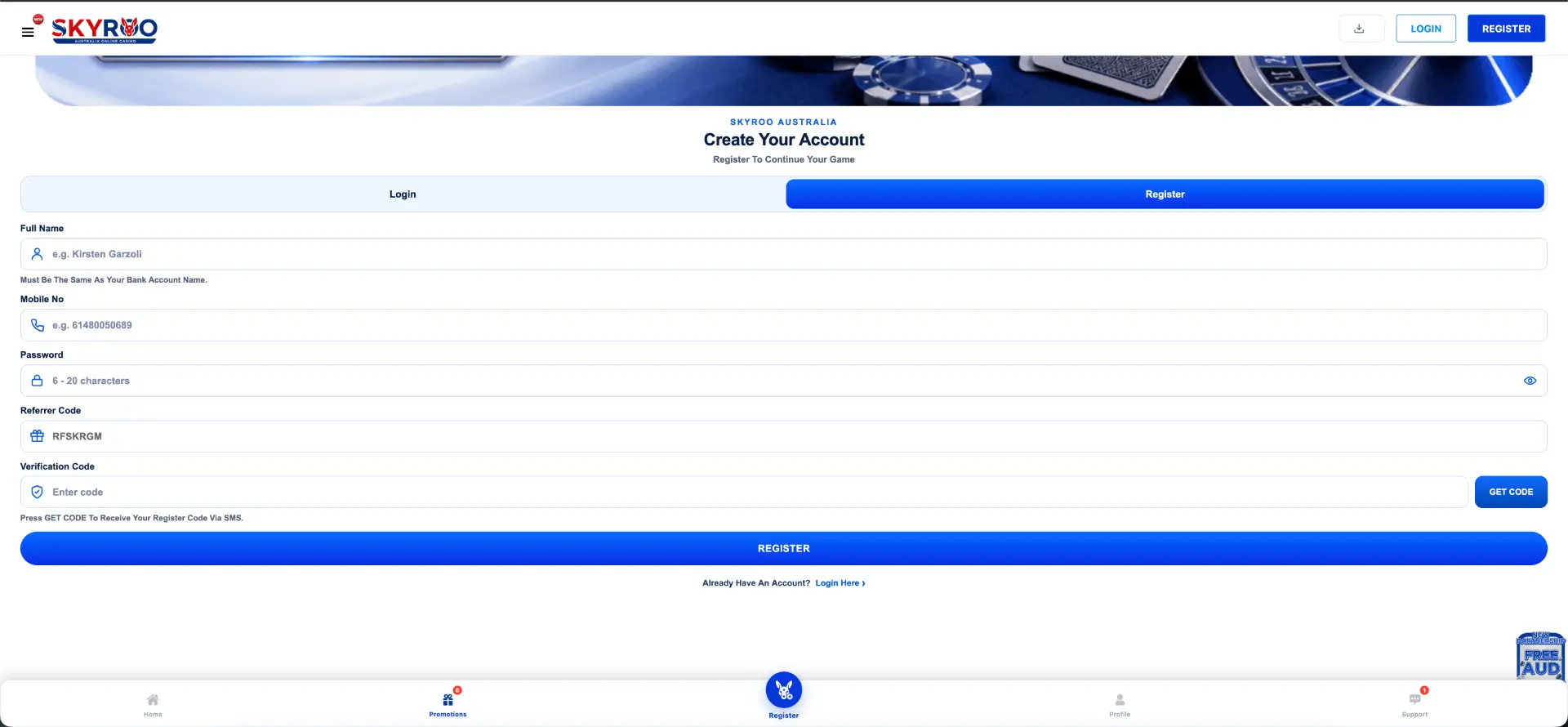
Quick registration flow
- Select the Register tab, or tap "Create Your Account" under the login form.
- Enter your full name. The form states plainly that it must be the same as your bank account name.
- Add your mobile number in 61 format.
- Set a password between 6 and 20 characters.
- Drop in a referrer code if a mate has sent one through.
- Press GET CODE and wait for the SMS.
- Enter the verification code and hit REGISTER.
Get the name right at this point. If it doesn't match the account you'll be withdrawing to, you'll be sorting it out with support later instead of collecting your winnings.
Secure sign-in habits
- Use a password you don't use anywhere else - 20 characters is the ceiling, so make the most of it with a mix of letters, numbers and symbols.
- Leave Keep Me Logged In unticked on shared or work machines.
- Lock your handset with a PIN or biometrics. Since account recovery runs through SMS, whoever holds your phone holds the keys.
- Type skyrooauss.com yourself or use a saved bookmark rather than clicking through from a random message.
- Nobody from Skyroo platform needs your password. Support won't ask for it, and anyone who does is having a lend of you.
- Log out on a borrowed device before you hand it back.
Password recovery at Skyroo platform
The Forgot Password? link sits on the right-hand side of the login form, level with the Keep Me Logged In box.
Reset steps
- Open the login screen and tap Forgot Password?.
- Enter the mobile number registered to the account.
- Request the verification code and wait for the SMS to land.
- Enter the code, then set a new password between 6 and 20 characters.
- Return to the login form and sign in with the new details.
No SMS after a couple of minutes? Check your signal, make sure the number is in 61 format, and confirm you haven't got the platform blocked in a message-filtering app before you request another code.
Mobile login
Skyroo platform online is mobile-first by design, so the login screen is built for thumbs - full-width fields, a big LOGIN button and the fixed bottom bar carrying Home, Promotions, Register, Profile and Support underneath.
Tips for signing in on a phone
- Add the site to your home screen for a one-tap entry point that skips the browser address bar.
- Let your phone's password manager save the details rather than using a simple password you can remember.
- If the keyboard hides the button, collapse it before tapping LOGIN.
- On patchy 4G, wait for the page to settle before submitting - a half-loaded form can drop the request.
Troubleshooting Skyroo platform login errors
Incorrect credentials
Most failed sign-ins come down to the number format. Use 61 and drop the leading zero - 0480 050 689 becomes 61480050689. Check the password with the eye icon before you submit, and remember it's case sensitive. Three or four failed goes in a row and it's quicker to reset than keep guessing.
Browser or cache issues
If the page loads but the form won't respond, or the session drops straight after submitting:
- Clear cache and cookies, then reload.
- Switch off script and content blockers for the site.
- Try another browser - Chrome and Safari both behaved during testing.
- Close old tabs of the same site; two open sessions can knock each other over.
SMS code doesn't arrive
Codes come by SMS, so anything blocking messages blocks your access. Confirm the number on file, check you're in range, and give it a minute before requesting another. Roaming overseas can hold codes up.
Account blocked or locked
Access can be paused where the platform flags duplicate accounts, mismatched details or unusual activity - the Mission Hub terms spell out that duplicate account usage and system abuse can cost you rewards outright. If you're locked out, contact support through the bottom bar or [email protected] with your registered number ready.
What you can reach after login
The following image shows Skyroo account area after login.
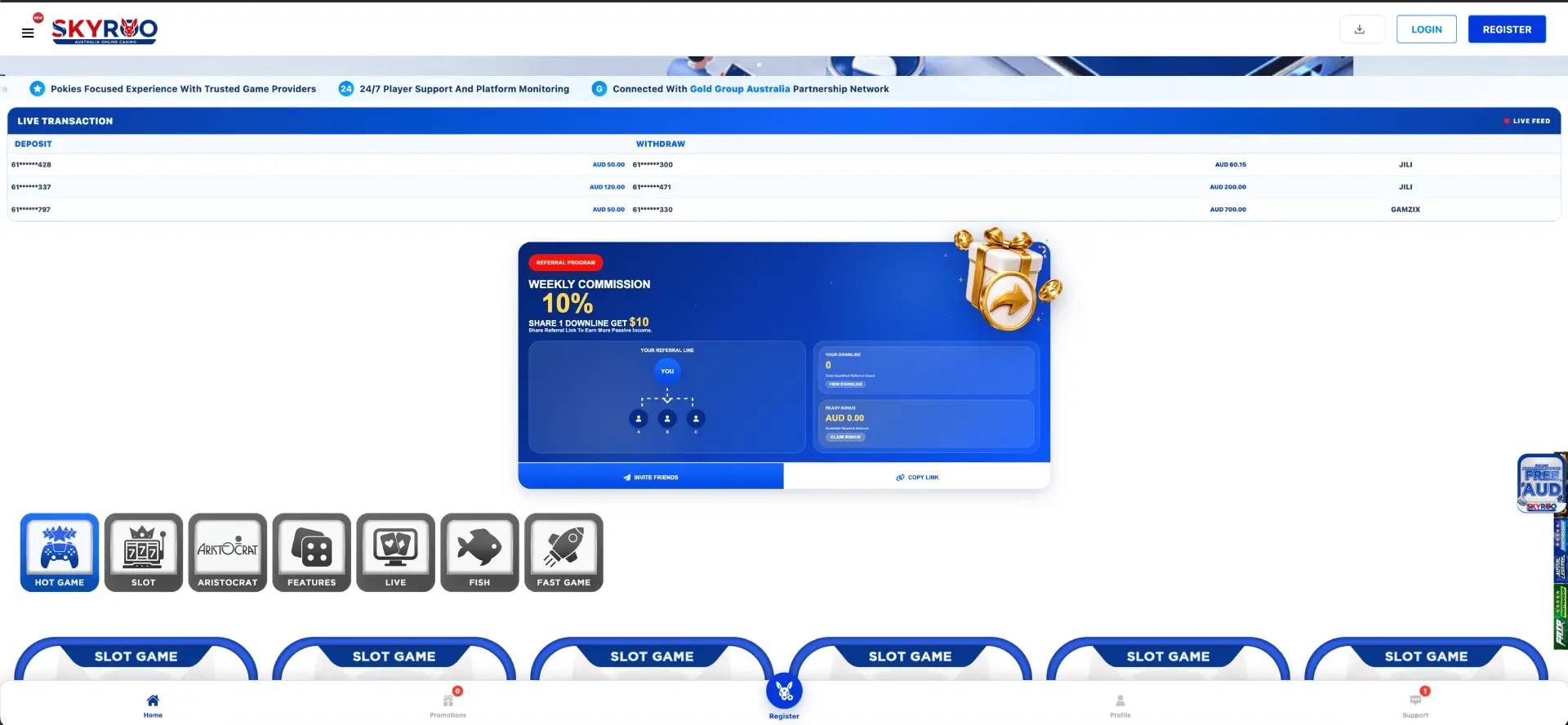
- Pokies lobby - the full provider grid including JILI, Hacksaw Gaming, BGaming, Booongo, ACE333, FA CHAI, ACEWIN and the Aristocrat tab.
- Cashier - AUD deposits and withdrawals via PayID, cards, bank transfer, Apple Pay, Google Pay, Neteller, Skrill and crypto.
- Promotions - including the tiles that show "AUD ?" while you're logged out, such as the Welcome Bonus amount.
- Mission Hub - daily and weekly tasks, points balance, ticket redemption and the exchange counter.
- Referral panel - your downline tree, Ready Bonus balance, invite link and 10% weekly commission.
- Leaderboard - the Daily Top 50 with Today, Yesterday and All Game filters.
Account verification (KYC)
Signing in and depositing is one thing; getting paid is where identity checks come in. Verification is usually triggered by a first withdrawal request, a change of payment method or a larger than usual payout.
Have this lot ready so you're not scrambling:
- Government-issued photo ID - driver licence or passport.
- Proof of address issued within the last three months, such as a utility bill or bank statement.
- Proof of the payment method in your own name, matching the full name on your Skyroo platform account.
That name-match rule is stated on the registration form itself, so it isn't a surprise clause buried in the terms. Send clear, uncropped photos with all four corners visible and you'll save yourself a round trip.
FAQ about the Skyroo platform login
What do I use to log in to Skyroo platform?
Your registered mobile number in 61 format, or your username, plus a password of 6–20 characters. No email address is involved.
Where is the Skyroo platform login page?
At skyrooauss.com/login. You can also tap LOGIN in the top-right of any page or use the Register tab to switch between the two forms.
What do I do if I forget my password?
Use the Forgot Password link on the login form, verify by SMS to your registered number and set a new password of 6–20 characters.
Can I stay signed in?
Yes - tick Keep Me Logged In before pressing LOGIN. Leave it off on any device other punters can get to.
Does Skyroo platform online use two-step verification at login?
The login form asks for your number or username and a password. SMS codes are used at registration and for recovery, so treat phone security as part of your account security.
Why is my account locked?
Duplicate accounts, mismatched details or activity flagged by the platform's monitoring can pause access. Contact support with your registered number and any documents already on file.
Do I need to verify my identity before I can log in?
No. Verification is tied to withdrawals and account changes rather than day-to-day sign-in.
18+. Gambling can be addictive - play responsibly and set a limit before you start. Free support is available in Australia through Gambling Help Online on 1800 858 858.